
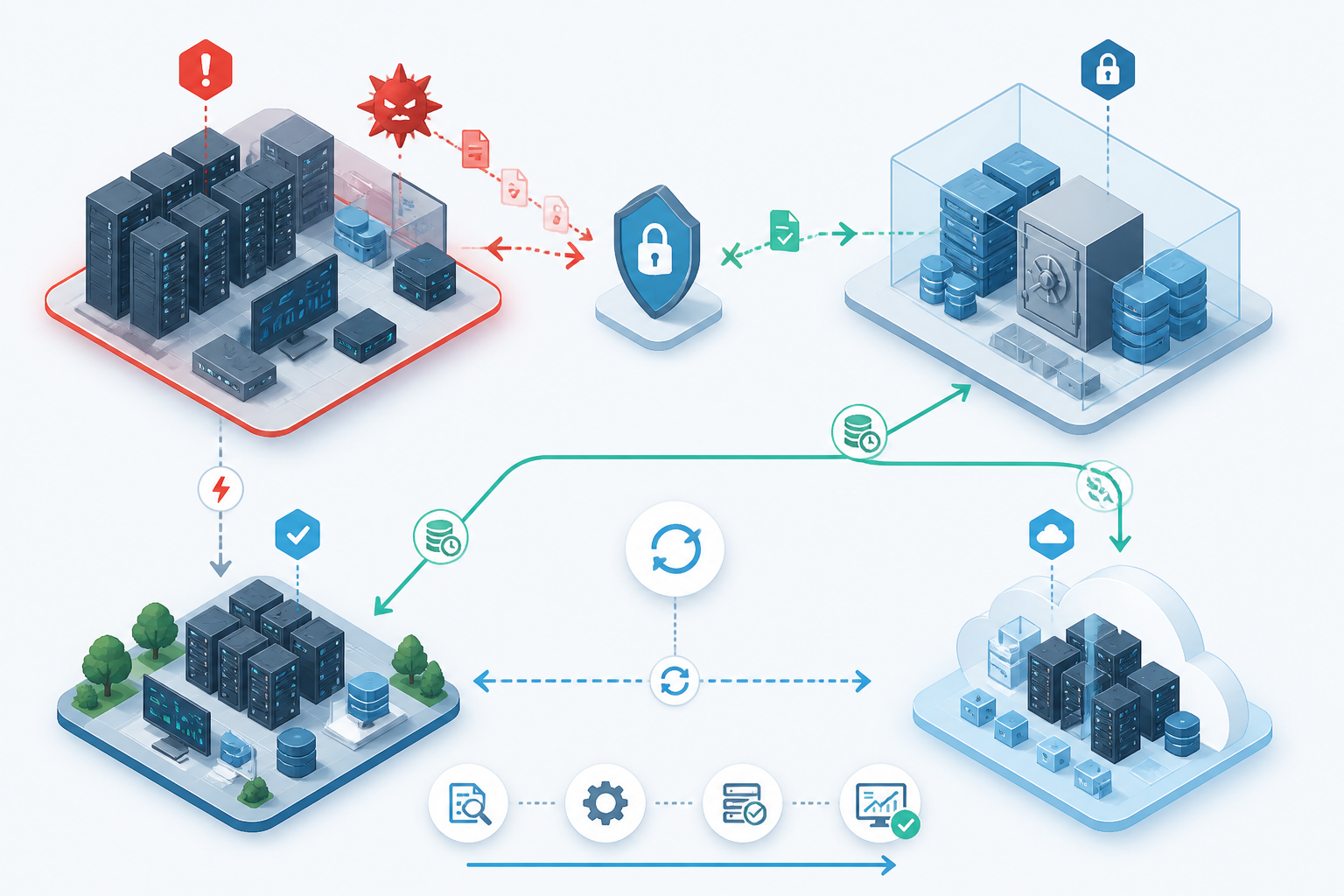
There is a persistent habit in IT operations of treating “we have backups” as if it were the same thing as “we can recover”. It is not. Backups are a component of resilience; disaster recovery is the operating model that tells you how you will restore service after something has gone properly wrong. That distinction matters more now than it did a few years ago, because the common failure mode is no longer just a dead disk or a corrupt database. It is ransomware, accidental deletion, cloud misconfiguration, identity compromise, a regional outage, or a combination of all four.
The practical test is simple: if your backup vanished, or restored too slowly, or came back into an environment that was still compromised, would you still meet the business need? If the answer is no, then you have a backup programme, not a disaster-recovery strategy.
In brief
- Backups preserve data; disaster recovery restores service. Those are related, but not interchangeable objectives.
- Recovery time matters as much as recovery point. A usable backup that takes two days to reconstitute may still be a business failure.
- Modern DR has to assume compromise. Offline or immutable copies, tested restores and isolated access are now baseline requirements.
- Cloud services do not remove responsibility. Most providers give you tools, but you still need the plan, the permissions and the testing.
- DR is only real when exercised. If you have not restored under time pressure, you do not know your actual resilience.
Backup and disaster recovery are not the same problem
NIST’s definition of a disaster recovery plan is a written plan for recovering systems at an alternate facility in response to major failure or destruction, which is already a broader remit than simply keeping copies of data. Microsoft’s current Azure guidance is even more explicit: backup recovery should be used as a last resort, and a disaster recovery plan should define the sequence of steps and recovery attempts before restoring from backup. In other words, restore-from-backup is not the strategy; it is one possible tool inside the strategy. (csrc.nist.gov)
This is the first place organisations go wrong. Backup answers “do we still have the bits?”. Disaster recovery answers “how quickly, and under what conditions, can we return the service those bits support?”. Those are different questions, because a business does not buy storage snapshots for the sake of it. It buys payroll continuity, order processing, customer service, email, file shares, ERP, clinical systems or line-of-business applications. A backup can be technically perfect and still fail the business if restoring it requires too much manual work, too much clean-up, or too much time. (nvlpubs.nist.gov)
Why the old mental model broke
The old model was comforting: take nightly backups, send some tapes off-site, and you have covered disasters. That was never complete, but it was often good enough for simpler failure modes. Today’s failure landscape is harsher. CISA’s current StopRansomware guidance recommends offline, encrypted backups, regular testing of backup availability and integrity in a disaster-recovery scenario, and the maintenance of golden images for critical systems. That is a more demanding baseline than “copy the files somewhere safe”. (cisa.gov)
The reason is obvious enough to anyone who has had to investigate an incident: the systems you are trying to recover are often the same systems that were attacked. If the backup repository is reachable from the compromised domain, or the backup admin credentials are reused, or the recovery path depends on the same identity plane, the attacker may be able to damage the last good copy as well. CISA specifically warns that ransomware variants attempt to find and delete or encrypt accessible backups so restoration becomes impossible without paying. (cisa.gov)
That means resilience is no longer just about retention policy. It is about isolation, immutability, access separation, and the ability to rebuild trust in the environment before you reintroduce data. For many organisations, that is the real work of DR: not recovery of bytes, but recovery of a trustworthy platform. (cisa.gov)
What a proper disaster-recovery strategy includes
A defensible DR strategy usually has at least five parts.
- Clear recovery objectives. You need defined RPO and RTO targets for each service, not a single “all systems must be back quickly” aspiration.
- Protected copies of data. That means offline, air-gapped, immutable, or otherwise isolated backups, depending on the risk profile.
- Known-good rebuild paths. Golden images, infrastructure-as-code, configuration backups, license records and dependency mapping matter as much as the data itself.
- Alternate recovery capability. This may be a standby site, a second region, a clean cloud subscription, a recovered hypervisor cluster or a temporary service substitute.
- Repeated testing. Not just file-level restores, but full service recovery drills under realistic constraints.
NIST’s contingency planning guidance is useful here because it shows that backup strategy and recovery strategy are linked but not identical. The document discusses backup methods, off-site storage, and the relationship between backup and recovery strategies; it also notes that the appropriate method depends on the system’s availability and integrity requirements. That is the key operational judgement: the right backup method depends on how quickly and how completely you need to recover. (nvlpubs.nist.gov)
Practical checklist
- Define RPO and RTO separately for each service, not just for the platform overall.
- Verify that backup copies are isolated from the primary identity plane and from admin accounts used day to day.
- Test whether backups restore into a clean environment, not just back into the same broken one.
- Document the order of recovery: identity, networking, storage, core services, applications, then data.
- Include application owners, not just infrastructure staff, in recovery tests.
- Track the time taken to recover, not only whether the restore technically succeeded.
The cloud does not remove the distinction
Cloud platforms can make backup and recovery easier, but they do not collapse the difference between them. AWS Backup is positioned as a way to centralise and automate backup across AWS services and on-premises, while AWS guidance also distinguishes recovery workflows and the metadata required to restore resources. Google Cloud’s Backup and DR Service explicitly frames its service around disaster recovery, business continuity, and development/test activity. Microsoft, likewise, separates backup capabilities from broader business continuity and disaster recovery planning. The pattern is consistent: providers offer tools; you still own the operational outcome. (docs.aws.amazon.com)
That distinction matters in hybrid environments, which are still the norm for many UK organisations. A VM backup in the cloud does not automatically give you a recoverable service if the application depends on on-premises authentication, firewall rules, DNS, certificates, SaaS identities or a SAN that is not present in the recovery location. The backup may be intact, but the service is not recoverable until all the dependencies are rebuilt. In practice, the hardest part of DR is often not the data restore itself; it is recreating the conditions in which the data can be used safely. This is an inference, but it is exactly the sort of dependency problem that modern platform guidance is trying to address. (learn.microsoft.com)
Ransomware changes the economics
Ransomware is the most obvious reason backup is not enough. CISA’s guidance advises offline backups, regular testing, golden images, logging, alerting and object-lock or delete protection where supported. That list is effectively a blueprint for making recovery possible after the attacker has tried to destroy your first line of defence. It is also a reminder that “backup success” in the console is not a meaningful endpoint if the copies are still accessible to compromised credentials. (cisa.gov)
CISA also notes that organisations should conduct a business impact analysis to understand backup and recovery needs, and that registration data may not be sufficient to restore operations after a ransomware attack. That is a useful reality check: when a business is under attack, the question is not whether a backup exists, but whether it contains enough of the operational fabric to bring services back safely. (cisa.gov)
For enterprise IT teams, that means DR must assume compromise by default. If the backup vault is online, it needs immutable controls. If the restore path depends on privileged accounts, those accounts need strong separation. If the application is multi-tier, the recovery sequence needs to be explicit. If you cannot restore without calling three vendors and waiting for someone to remember the DNS zone export, the strategy is weak even if the backup job has been green for months. (cisa.gov)
How to judge whether you have backup, or DR
| Question | Backup only | Disaster recovery |
|---|---|---|
| Can I recover data? | Usually yes | Yes, but as part of a broader service-restoration process |
| Can I recover a whole service? | Not necessarily | Yes, within defined objectives |
| Is the recovery path isolated from compromise? | Often weak or undefined | Designed to survive attacker access |
| Have we tested full recovery under time pressure? | Sometimes only file restores | Yes, with documented evidence |
| Do we have alternate infrastructure or a clean rebuild path? | Usually no | Yes, at least for critical services |
If your answers mostly land in the left-hand column, you may have very good backup hygiene. That is worthwhile, but it is not the same as resilience.
What good looks like in practice
A realistic enterprise DR design tends to be boring rather than glamorous. It has an off-site or logically isolated copy of data. It uses a second admin path or break-glass access model. It documents what must come up first. It knows which systems can be restored from backups and which must be rebuilt from images or code. It is tested often enough that the team can operate under pressure without improvisation. In some cases, the better answer is a warm standby or replicated service; in others, it is an acceptance that restore-from-backup is the right answer, but only for some workloads. (nvlpubs.nist.gov)
That trade-off is where judgement comes in. Not every workload deserves an expensive active-active design. Not every system needs near-zero RTO. But every important system deserves a recovery plan that matches the consequences of failure. If payroll can wait overnight but customer order processing cannot, then their DR designs should look very different. If a system can be rebuilt from source-controlled configuration in two hours, that is often a better resilience story than a pile of frequent backups that still leaves you blind during restore. This is a practical conclusion drawn from the current guidance rather than a vendor prescription. (nvlpubs.nist.gov)
My view
For most organisations, the phrase “backup vs disaster recovery” is best understood as a maturity test. Backup is about preserving data with sensible protection. Disaster recovery is about proving that the business can resume meaningful operation after a serious disruption, even if the primary environment is gone or untrustworthy. If you cannot demonstrate that sequence on paper and in test, you are still relying on hope.
That does not mean every site needs expensive replica infrastructure. It does mean every important workload needs an honest recovery objective, an isolated backup set, a clean rebuild path and a real drill. In 2026, anything less is not resilience; it is storage with a comforting label on it.
Sources and further reading
- NIST CSRC Glossary: disaster recovery plan (DRP)
- NIST Special Publication 800-34 Rev. 1: Contingency Planning Guide for Federal Information Systems
- CISA #StopRansomware Guide
- CISA Ransomware guide PDF
- Microsoft Learn: What are Business Continuity, High Availability, and Disaster Recovery?
- Microsoft Learn: Azure Backup Security Best Practices for Data Protection
- AWS Backup Documentation
- AWS Backup: Restore a backup by resource type
- Google Cloud Backup and DR Service documentation
Spot an error?
If something factual looks wrong, outdated or misleading, flag it here. Corrections are reviewed separately from normal article comments and reader questions.